
Unit 3 - Introduction to SQL
Key Concepts
In Unit 3, I explored the core principles of SQL, focusing on PostgreSQL. This unit covered everything from database transactions to query optimization, providing a solid foundation for managing structured data effectively.
ACID Properties – Ensuring Data Reliability
ACID (Atomicity, Consistency, Isolation, Durability) guarantees that database transactions are reliable and secure:
-
Atomicity: A transaction is all-or-nothing. If one part fails, the entire operation is rolled back to maintain data integrity.
-
Consistency: The database always moves from one valid state to another, ensuring that constraints and rules are not violated.
-
Isolation: Multiple transactions execute independently, preventing data inconsistencies caused by concurrent operations.
-
Durability: Once a transaction is committed, it remains in the database, even in the event of a system crash.
These principles are fundamental to financial systems, e-commerce platforms, and any application where data integrity is critical.
SQL Data Definition – Structuring the Database
SQL Data Definition Language (DDL) provides commands to define and modify database structures:
-
CREATE TABLE – Defines a new table with specified columns and constraints.
-
ALTER TABLE – Modifies an existing table by adding or removing columns.
-
DROP TABLE – Deletes a table and all its data permanently.
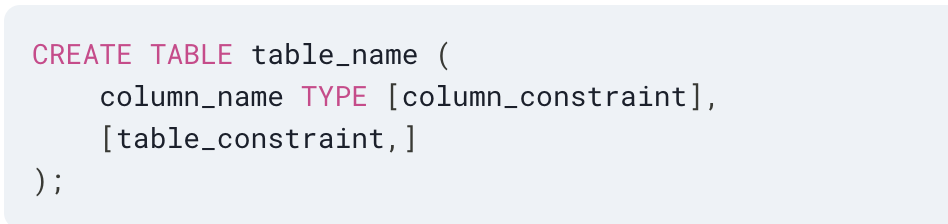
A well-structured database prevents redundancy, optimizes storage, and ensures data consistency.
Constraints in SQL – Enforcing Data Integrity
Constraints define rules for valid data entry, preventing inconsistencies and errors:
-
Primary Key – Ensures that each row is uniquely identifiable.
-
Foreign Key – Establishes relationships between tables.
-
NOT NULL – Prevents missing values in critical columns.
-
CHECK – Validates data against specific conditions.
-
UNIQUE – Ensures no duplicate values in a column.
By enforcing these constraints, databases maintain accuracy and reliability, reducing the risk of corruption.
Basic Structure of SQL Queries
A typical SQL query follows a structured format:
SELECT column_name(s)
FROM table_name
WHERE condition
GROUP BY column_name
HAVING condition
ORDER BY column_name;
Each clause serves a distinct purpose:
-
SELECT – Specifies the columns to retrieve.
-
FROM – Defines the source table.
-
WHERE – Filters data based on conditions.
-
GROUP BY – Aggregates data (e.g., total sales per region).
-
HAVING – Filters grouped results.
-
ORDER BY – Sorts the output.
Mastering this structure ensures efficient data retrieval and better database performance.
PostgreSQL Meta-Commands – Simplifying Database Management
PostgreSQL provides powerful meta-commands to streamline database operations:
-
\dt – Lists all tables in the current database.
-
\d table_name – Displays the schema of a table.
-
\q – Exits the PostgreSQL command-line interface.
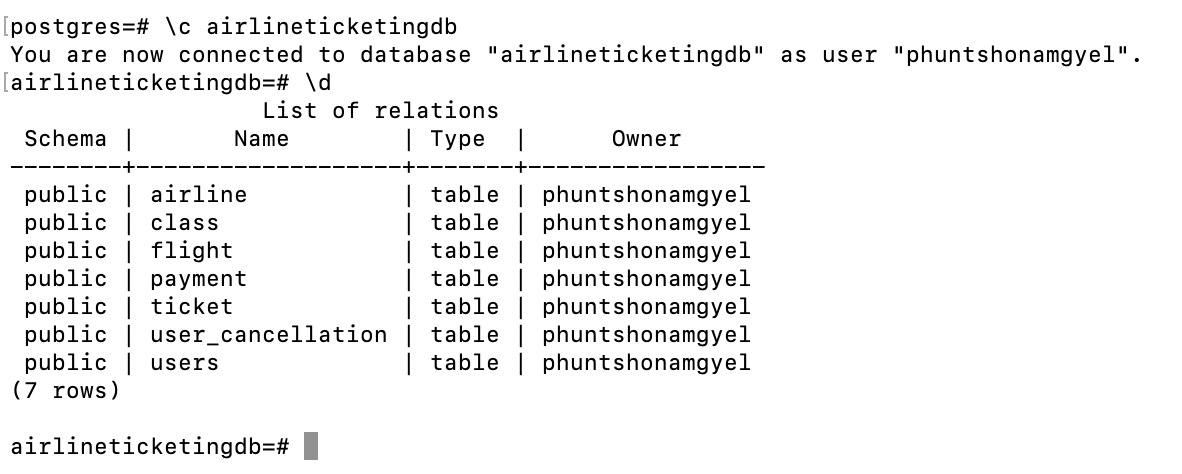 These commands enhance productivity and simplify database administration.
Handling NULL Values in SQL
NULL represents missing or unknown data, impacting queries in various ways:
-
Comparisons using = or != return false when involving NULL.
-
Aggregations (SUM, AVG) ignore NULL values by default.
-
COALESCE(value, fallback) replaces NULL with a default value.
Proper handling of NULL values ensures data integrity and accurate query results.
Aggregate Functions – Summarizing Data
Aggregate functions perform calculations on multiple rows, commonly used with GROUP BY:
-
SUM(column) – Computes the total sum of a column.
-
AVG(column) – Calculates the average value.
-
COUNT(column) – Counts the number of rows.
-
MAX(column), MIN(column) – Identify the highest and lowest values.
These functions provide valuable insights for data analysis and reporting.
Nested Subqueries – Queries Within Queries
A subquery allows one query to be embedded inside another, executing before the main query. Example:
SELECT name
FROM employees
WHERE salary > (SELECT AVG(salary) FROM employees);
This query retrieves employees earning above the average salary, making complex data retrieval more efficient.
The WITH Clause – Enhancing Query Readability
The WITH clause defines temporary result sets, making complex queries more readable. Example:
WITH high_earners AS ( SELECT name, salary FROM employees WHERE salary > 50000 ) SELECT * FROM high_earners;
Using WITH improves maintainability and optimizes performance.
Window Functions – Advanced Data Analysis
Unlike aggregate functions, window functions compute results across a dataset without collapsing rows. Example:
SELECT name, salary, RANK() OVER (ORDER BY salary DESC) AS rank
FROM employees;
Common window functions:
-
RANK() – Assigns a ranking, skipping duplicate values.
-
ROW_NUMBER() – Assigns a unique row number.
-
LEAD(), LAG() – Access previous or next row values.
These functions are essential for analytics, reporting, and trend analysis.
Key Takeaways
-
ACID properties ensure reliable database transactions.
-
Constraints enforce data integrity, preventing errors and inconsistencies.
-
SQL queries follow a structured format for efficient data retrieval.
-
Aggregate functions and GROUP BY enable meaningful data analysis.
-
Nested subqueries and WITH clauses optimize query execution.
-
Window functions provide advanced analytical capabilities without altering row counts.
Conclusion
This unit gave me a deeper appreciation for SQL beyond just writing queries. Learning about constraints, subqueries, and window functions showed me how to make database operations more efficient and reliable. ACID properties, in particular, reinforced why transactional integrity is non-negotiable in fields like banking, healthcare, and e-commerce.
SQL isn’t just about pulling data—it’s about structuring, optimizing, and protecting it. PostgreSQL’s powerful features make it an essential tool for managing complex databases. Moving forward, I’m excited to apply these concepts in real-world projects, building efficient, scalable, and secure database systems.